Just when you think you're all out of ideas for creative uses of technology someone always comes up with another great idea. Today, I stumbled across two: the tweeting @ChicagoCabbie and Heineken's use of the U-Code.
One Chicago cab driver is using Twitter to tweet discounts and lets you know where he is on Google Latitude or Find my Friends. Rashid Temuri tells ARS Technica he sees as much as 90 to 95 percent repeat business from social media clients. Pretty cool, huh? Read the complete story here & take a look at an interview on Tweetheart TV.
The other great find today (thanks Stephanie Wonderlin) is a video about Heineken's use of the "U-code." Ever wonder what you can do with a QR code? I'll leave it the video to do the explaining.
Showing posts with label Twitter. Show all posts
Showing posts with label Twitter. Show all posts
Wednesday, January 4, 2012


Sunday, January 30, 2011
Boxcar: The Most Important Twitter App I Use

Why do I say that? Twitter, until recently did not have push-notifications for its Twitter for iPhone application (& it's still no where near as powerful as Boxcar). When I began using Twitter, I wanted to know in real-time who was communicating with me. I did not want check-in to see if someone had pinged me. My desire is to use Twitter as the real-time information tool that it can be. And, Boxcar allows me to do this.
What's powerful about Boxcar?
- Its ability to catch all mentions, @ replies and all RTs. Boxcar will push-notify you of any tweets where you are mentioned, all the @ replies, and maybe best of all, "new school" and "old school" RTs. If you use Twitter's web interface, "new school" RTs will appear under "Your Tweets, Retweeted" and "old school" RTs will appear under "mentions." Boxcar doesn't care and delivers them all. Boxcar will even catch tweets that Twitter won't! For example, if you tweet something and a follower "old school" RTs you and then one of their followers "new school" RTs them you won't see that anywhere on Twitter since you aren't being retweeted, it's your follower that is. But, Boxcar still catches it and notifies you. Very powerful.
- Its ability to show you your tweets that have been marked "favorite" by others. I don't know of another tool that shows you this & definitely Twitter does not. (Yes, folks don't always "favorite" tweets because they like them, instead maybe using it as a bookmarking feature. Regardless, it's great to see it anyway.)
- Its ability to show you new followers. I don't receive 100% of emails from Twitter when I have a new follower. But, I know with Boxcar I will see them all.
- Its ability to show you new lists you've been added to. I don't regularly check the lists I am on from the Twitter interface but I am definitely interested when Boxcar notifies me. It's also an instant way to say "thanks" to those who have listed you.
- Its ability to notify you of direct messages. I don't have to wait for an email to know I have a direct message. Again, I like instant notifications.
- Its ability to open my Twitter for iPhone app. When I receive a notification and I "unlock" my phone to view the message, Boxcar will automatically open my Twitter for iPhone app. (It supports a number of other third-party Twitter applications, too.)
Boxcar helps me make Twitter more powerful, usable and allows me to respond quickly - just like I received a text message.
Boxcar also has a host of other services it will notify you of, including, Facebook, Gowalla, Foursquare, email, RSS and more. A complete list is here.
Thursday, January 20, 2011
Why I Use Formulists for My Twitter Lists
When I first joined Twitter, I didn't understand why lists could be helpful. I figured I could manage a few hundred folks I was following through my "home feed" and I felt that if I created a list I might miss out on something. Stephanie Wonderlin (@swonderlin) and Felicia Adams (@baddmom) said I was really missing out.
 The longer I was on Twitter and the more I learned, I realized Stephanie and Felicia were right - lists were a great thing. But, I didn't want to go through the process of adding 2,000-plus folks into lists. The tool I found most helpful was Formulists: an automatic list service.
And, here's how I use Formulists:
First, I determined what lists I was going to use and what I wanted to accomplish. I knew that I wanted to add Austin people, I wanted to track new followers (to get to know them), also look at folks I recently followed and track those who unfollowed me. Formulists lets me accomplish all these goals. It was also important that Formulists let me make my lists public and private.
Creating Custom Lists that Work for You
I took advantage of custom lists to stay engaged with folks in Austin. You can modify the steps below to create your own custom lists around topics, locations, bio information.
1. Choose "Create Custom List."

2. Name your list (Austin-Followers), make it public/private, build your list (I chose from @DrewCarls's Followers) and I told it to update automatically (this is helpful in case people move out of Austin or stop following you then they will be removed).

3. Under the Basic Options tab, I rewrote the description and made it the maximum of 500 for the list size.

4. Under the Profile Filter tab, I said Filter Location by "Austin" or "ATX". You have numerous options here to filter by bio (social media, marketing, cyclists, etc.), tweet age, followers and following.

5. Done!
Hint: What happens when you have more than 500 people for your list? In my case, I have more than 500 followers with Austin or ATX in their bio. I created a second list mirroring the steps I used above but added one extra step under number 2. I told Formulists I wanted to pull from my followers BUT remove anyone that was already in @DrewCarls/Austin-followers.

Here's a look at the other Formulists I use - by the way, most of these lists are preset:
Public:
- Recent Interactions: I keep this list set to update every 14 days. It's a great list to keep up with the folks I've tweeted with in the past two weeks.
- Austin Following: I created a custom list (how-to below) for anyone who listed "Austin" or "ATX" in their location. I should probably expand to capture those who listed Austin metro areas but haven't updated that yet. It's also important to note that someone who doesn't list a location in their bio will not appear (including those accounts using coordinates).
- Austin Followers: Another custom list for anyone following me and listing "Austin" or "ATX" in their Twitter bio.
Private:
- Does Not Follow Me Back: This list helps me track those who don't follow back. It's an easy way to see who but also lets me engage with these folks, too.
- Listed Me: Easy to see who's listed you in Twitter.
- Mutual Friends: See who your friends are talking to. A great way to find new people to follow.
- People I ReTweet: Nice to keep up with those whose content you RT.
- People Who ReTweeted Me: Great way to keep a short-list of folks who RT you.
- Recently Followed Me: This list helps me get to know people who I've recently connected with. I've set this list to leave folks in this list for 14 days.
- Recently Unfollowed Me: I keep people who unfollow me in this list for 7 days. I check the list every few days to see who's unfollowed me. It's a good way to see if maybe your tweets are losing followers, may give you an indication why someone unfollowed you. For me, it's all about understanding and knowledge with Twitter and this helps me in this goal.
- Who I Recently Followed: Same as Recently Followed Me.
- Who My Friends Talk To: Pretty similar to Mutual Friends but it's another way to connect with folks your Twitter buddies tweet with.
Tip: I set all my lists to the Twitter maximum - 500. Why limit the number of folks in your lists?
- Recently Followed Me: This list helps me get to know people who I've recently connected with. I've set this list to leave folks in this list for 14 days.
- Recently Unfollowed Me: I keep people who unfollow me in this list for 7 days. I check the list every few days to see who's unfollowed me. It's a good way to see if maybe your tweets are losing followers, may give you an indication why someone unfollowed you. For me, it's all about understanding and knowledge with Twitter and this helps me in this goal.
- Who I Recently Followed: Same as Recently Followed Me.
- Who My Friends Talk To: Pretty similar to Mutual Friends but it's another way to connect with folks your Twitter buddies tweet with.
Tip: I set all my lists to the Twitter maximum - 500. Why limit the number of folks in your lists?
Tuesday, December 21, 2010
Should Social Media Be Renamed Shareable Media?
 |
| Courtesy of BrandingEye.com |
Instead of social media, I like to use shareable media.
Why do I say shareable media? How are you engaging with content and its creators? Users share with others more often than there is direct social interaction; e.g. it’s a “share” button on Facebook. You RT someone on Twitter; you’re sharing, not socializing. You comment on a blog; that’s sharing your point-of-view or comment, not always creating a conversation since you may or may not get a response from the author. You “like” something on Facebook; again, you’re sharing a “thumbs up” but not necessarily having a conversation with the poster.
You, as a disseminator of content – original or not, are sharing with media platforms. You tweet; someone might see it but takes no action, reads it but doesn’t comment. You post a status update; someone will probably see it but may not comment. In many cases, people will see content you share but not always engage/be social with you. That’s why I like shareable media versus social media.
Do you agree or disagree? Share your comments below (and maybe I’ll be social). ;-)
Friday, November 5, 2010
Why Sharing is a Good Thing in Social Media
If you’re not a believer in the power of sharing & social media, I don’t know what to tell ya. If you’re looking to take things offline it’s easier, I think, to find folks in the city you live in. In my case, I look to make connections with Austin area folks. Why? Usually Austin people are connected to Austin people (you’re saying duh, I know). When you are following Austin people who follow Austin people on Twitter you’ll usually end up seeing their tweets between each other & can make some connections. The same can be said about LinkedIn.
When all of this happens, it makes it easier to connect with others quickly. But, you need to be sharing you and what you do. I understand the arguments for and against sharing personal information on Twitter and other social media platforms, like Gowalla. I’m finding a good mix of personal sharing and “business” sharing makes a recipe ripe for connections. Here are a few examples just from today.
Started off the day with a meeting about the state of the legal industry with someone I meet through Twitter. Today, was the first day we had meet in real life. Just before the meeting I checked-in on Gowalla & pushed this update to Twitter.
Started off the day with a meeting about the state of the legal industry with someone I meet through Twitter. Today, was the first day we had meet in real life. Just before the meeting I checked-in on Gowalla & pushed this update to Twitter.
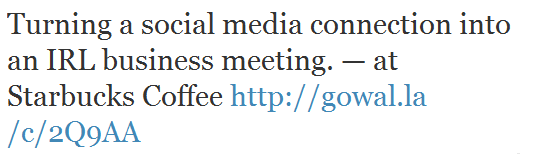
Two things I shared in this tweet: where I was & what I was doing. Obvious, right? What I love about Twitter and social sharing is that I then received a tweet from @LizWinks.

Wow, pretty cool. She gave me a drink recommendation. Ok, so I actually tried it. (Pretty good, too.) All in real-time. Most of this is helped since I have the Boxcar app installed on my iPhone & notifications are pushed to me similar to a text message.
The sharing continues. Liz commented on my location & now @EricStoller was commenting on the fact that I am taking social media from online to offline. He sent this Tweet:
The sharing continues. Liz commented on my location & now @EricStoller was commenting on the fact that I am taking social media from online to offline. He sent this Tweet:

Since Eric retweeted that to his followers, @Thomasav chimed in with:
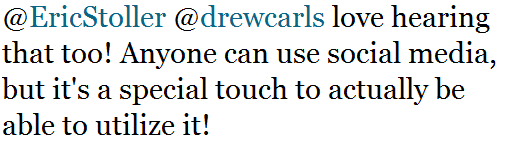
Just another way to build Twitter connections, folks replying. So, with just one tweet that was about sharing what I was doing I had a drink recommendation and two comments on the content shared. Pretty cool, no?!
After that business meeting, I had lunch with a good friend at Maudie’s in north Austin. And, what do I usually do? Check-in! I checked-in on Foursquare and Gowalla. I didn’t push either of these two updates to Twitter or Facebook but still made another connection. First, I got a teasing from @willsmom that I was at lunch without her. Second, a few minutes later @joeymcgirr checked in on Foursquare at Maudie’s and sent this update to Twitter. Well, Joey and I are friends on Foursquare but until today have only been Twitter friends. Since we are friends on Foursquare & he pushed this update to Twitter, here’s his update:
After that business meeting, I had lunch with a good friend at Maudie’s in north Austin. And, what do I usually do? Check-in! I checked-in on Foursquare and Gowalla. I didn’t push either of these two updates to Twitter or Facebook but still made another connection. First, I got a teasing from @willsmom that I was at lunch without her. Second, a few minutes later @joeymcgirr checked in on Foursquare at Maudie’s and sent this update to Twitter. Well, Joey and I are friends on Foursquare but until today have only been Twitter friends. Since we are friends on Foursquare & he pushed this update to Twitter, here’s his update:

Yep, we were in the same place at the same time! We would have only known this from the Foursquare check-in…otherwise just another missed connection. We both realized we were eating at the same place and Joey initiated the quick meeting in real life. Love this stuff. And, I learned he was eating with @willstaney who had just left for another meeting. There’s the power of check-ins.
Finally, I’ll wrap up with another sharing example from yesterday. @AustinFit asked who was going to @gypsypicnic & I replied I was. (The @AustinFit account is managed by my brother @WestonCarls so I was giving him a hard time.) When I replied, @scratchex saw my reply since he is following both me & @AustinFit & let us know he was going to be there. Then @lovingthebike saw us all tweeting & said he was going to be there. Cool! Up to four. Then I saw @KarlMiller mention he was going as well today so I “tagged” all of us & my roommate @ericschoppe on the next tweet to continue connecting us all. This can be especially powerful if not everyone knows or follows each other. And, right now, this continues. I continue to see people mention @gypsypicnic. Looks like it will be a big tweet-up.
Don’t be afraid to share what you’re up to. You never know who else is interested or might be going to the same event you are. It just adds up for a win-win.
Have a story about connecting by sharing? Would love to hear it.
Finally, I’ll wrap up with another sharing example from yesterday. @AustinFit asked who was going to @gypsypicnic & I replied I was. (The @AustinFit account is managed by my brother @WestonCarls so I was giving him a hard time.) When I replied, @scratchex saw my reply since he is following both me & @AustinFit & let us know he was going to be there. Then @lovingthebike saw us all tweeting & said he was going to be there. Cool! Up to four. Then I saw @KarlMiller mention he was going as well today so I “tagged” all of us & my roommate @ericschoppe on the next tweet to continue connecting us all. This can be especially powerful if not everyone knows or follows each other. And, right now, this continues. I continue to see people mention @gypsypicnic. Looks like it will be a big tweet-up.
Don’t be afraid to share what you’re up to. You never know who else is interested or might be going to the same event you are. It just adds up for a win-win.
Have a story about connecting by sharing? Would love to hear it.
Monday, October 4, 2010
Build Your Relationships Before You Need to Activate Your Network
This week I've been asked to speak to law students about networking & it's got me thinking about what I would say. When we say "network" I think it tends to make most people, especially students, uneasy. How do you network? When should you do it? Many questions come to mind.
I tend to look at networking as relationship building long before I need help from my network.
Let's say you are looking for your next career opportunity, it could be a lengthier search if you look to develop your web of contacts when you are no longer employed. Most folks will see the requested connection as nothing more than you needing something for nothing. Most people are happy to help, if they can, but it's going to be tough for them to be a strong advocate on your behalf if they've just met you. It's also probably not going to be at the top of their list to help a "stranger" land that next opportunity.
You should be connecting with others long before you ever need to seek their help. Build those relationships now & it will be much more powerful in the future. How can you meet new people? Considering connecting with others through Twitter or LinkedIn, attend happy hours with groups, be active in community groups, volunteer, join leadership groups, offer to serve on committees or boards...ultimately look to be active in whatever community you'd like to be connected to whether it's social media groups, nonprofit groups, higher education groups, marketing groups & so on. It is important to connect with those who share similar interests but don't neglect connecting with folks in areas outside your immediate interests. Everyone knows someone.
Two ways to build your relationships: be active in looking for opportunities to help & share what you're up to, where you'd like to be in your career & what you know.
When you're looking for opportunities to help, you may be surprised how many people will take you up on that offer. Recently, I emailed our staff social media collaborative listserv asking for help creating guidelines for a social media project I was tasked with. Turns out others were looking for the same resource. From this I was appointed to an ad-hoc committee responsible for creating social media guidelines for the University & last week we released the first social media guidelines for the University.
Building those relationships should also include sharing what you do. In my case, that's recruiting for the law school. A recent example. My brother & I live nearby a restaurant & stop in occassionally. We've come to know one of the employees. Last week she shared a story with us about how she found herself in some legal troubles & remembered that I worked at the law school. She was calling on someone (me in this case) from her network for help. I was happy to offer her a few attorney recommendations.
In these two basic examples, I've been able to build relationships with like-minded higher education & social media professionals as well as help an acquaintance connect with someone in my network.
Build your relationships now. Look to meet & get to know as many people as you can. You'll have a lot of fun learning from others & getting to know a variety of professionals. Don't forget to add value to your connections & relationships. Be there to help & they'll be there when you need it next.
How do you like meeting other people? What are the best ways to connect with others? How do you add value to your network?
--
Updated at 8:20 p.m.
My good friend, Amy Strecker, suggested I share this story.
Just before the beginning of my senior year at The University of Texas at Austin I knew I wanted to be more involved in the academic life of the University so I sought out ways to do that. The first thing I found was to apply to be an at-large member (the first year Senate did this) of the Senate of College Councils - the student academic advocates. After my interview, I was selected as one of the at-large members. During that year, each member was appointed to a sub-committee. I was selected for the core curriculum sub-committee.
The Commission of 125 had just released its report to the President. One of the recommendations was to improve undergraduate education. Because I was on the sub-committee looking at core curriculum I was very familiar with discussions that were taking place at the University. Soon thereafter, then-President Larry Faulkner hosted a reception for the Senate of College Councils. I had the privilege of discussing a number of issues that night with Faulkner & we soon turned to undergraduate education. I asked Faulkner what he planned to do. His response was to form a task force to review the recommendations & make recommendations as well. I blurted out that I wanted to sit on this committee.
A few weeks later I received a call from the President's office asking if I would be one of two students to sit on the 20-member Task Force on Curriculum Reform. The task force was chaired by then-School of Law dean & now President Bill Powers. After about a year we published our report & later the significant changes were made to undergraduate education at the University, including the creation of the School of Undergraduate Studies, changes to undergraduate advising, signature courses, strands & more.
It was a wonderful experience that lead to many great, new relationships with mentors & other role models that I still stay in touch with today. Always look for ways to be involved & give back ... and, eventually, good things will come your way.
I tend to look at networking as relationship building long before I need help from my network.
Let's say you are looking for your next career opportunity, it could be a lengthier search if you look to develop your web of contacts when you are no longer employed. Most folks will see the requested connection as nothing more than you needing something for nothing. Most people are happy to help, if they can, but it's going to be tough for them to be a strong advocate on your behalf if they've just met you. It's also probably not going to be at the top of their list to help a "stranger" land that next opportunity.
You should be connecting with others long before you ever need to seek their help. Build those relationships now & it will be much more powerful in the future. How can you meet new people? Considering connecting with others through Twitter or LinkedIn, attend happy hours with groups, be active in community groups, volunteer, join leadership groups, offer to serve on committees or boards...ultimately look to be active in whatever community you'd like to be connected to whether it's social media groups, nonprofit groups, higher education groups, marketing groups & so on. It is important to connect with those who share similar interests but don't neglect connecting with folks in areas outside your immediate interests. Everyone knows someone.
Two ways to build your relationships: be active in looking for opportunities to help & share what you're up to, where you'd like to be in your career & what you know.
When you're looking for opportunities to help, you may be surprised how many people will take you up on that offer. Recently, I emailed our staff social media collaborative listserv asking for help creating guidelines for a social media project I was tasked with. Turns out others were looking for the same resource. From this I was appointed to an ad-hoc committee responsible for creating social media guidelines for the University & last week we released the first social media guidelines for the University.
Building those relationships should also include sharing what you do. In my case, that's recruiting for the law school. A recent example. My brother & I live nearby a restaurant & stop in occassionally. We've come to know one of the employees. Last week she shared a story with us about how she found herself in some legal troubles & remembered that I worked at the law school. She was calling on someone (me in this case) from her network for help. I was happy to offer her a few attorney recommendations.
In these two basic examples, I've been able to build relationships with like-minded higher education & social media professionals as well as help an acquaintance connect with someone in my network.
Build your relationships now. Look to meet & get to know as many people as you can. You'll have a lot of fun learning from others & getting to know a variety of professionals. Don't forget to add value to your connections & relationships. Be there to help & they'll be there when you need it next.
How do you like meeting other people? What are the best ways to connect with others? How do you add value to your network?
--
Updated at 8:20 p.m.
My good friend, Amy Strecker, suggested I share this story.
Just before the beginning of my senior year at The University of Texas at Austin I knew I wanted to be more involved in the academic life of the University so I sought out ways to do that. The first thing I found was to apply to be an at-large member (the first year Senate did this) of the Senate of College Councils - the student academic advocates. After my interview, I was selected as one of the at-large members. During that year, each member was appointed to a sub-committee. I was selected for the core curriculum sub-committee.
The Commission of 125 had just released its report to the President. One of the recommendations was to improve undergraduate education. Because I was on the sub-committee looking at core curriculum I was very familiar with discussions that were taking place at the University. Soon thereafter, then-President Larry Faulkner hosted a reception for the Senate of College Councils. I had the privilege of discussing a number of issues that night with Faulkner & we soon turned to undergraduate education. I asked Faulkner what he planned to do. His response was to form a task force to review the recommendations & make recommendations as well. I blurted out that I wanted to sit on this committee.
A few weeks later I received a call from the President's office asking if I would be one of two students to sit on the 20-member Task Force on Curriculum Reform. The task force was chaired by then-School of Law dean & now President Bill Powers. After about a year we published our report & later the significant changes were made to undergraduate education at the University, including the creation of the School of Undergraduate Studies, changes to undergraduate advising, signature courses, strands & more.
It was a wonderful experience that lead to many great, new relationships with mentors & other role models that I still stay in touch with today. Always look for ways to be involved & give back ... and, eventually, good things will come your way.
Tuesday, September 28, 2010
Using Social Media to Stay Connected During University of Texas at Austin Emergency
What a day. Today, I was working at The University of Texas at Austin when a student killed himself on-campus. There were many lessons learned from this experience but the ability to share information in real-time through social media proved invaluable.
When I arrived on campus today, I saw several UT police officers - sirens going - race past me heading south toward to the middle of campus. I felt it was unusual but did not give it much thought beyond any emergency that needed police attention. After arriving to my office, I poured myself a cup of coffee and received a text message alert from the University notifying us that there was a gunman on campus at the PCL - one of our largest libraries.
My immediate reaction was to let my family know of the situation, so I sent them a group text. And, my next thought was to alert others through my Twitter and Facebook accounts. I knew folks would be impacted with the information if they had not received it already. We were in a lockdown. A social media firestorm began...
Retweets on Twitter started and Facebook comments were next. Many people I share my social media space are connected to the UT campus and had an interest in the updates.
As I received updates from the school - main campus and the law school - I began sharing what information I had. I also shared information I had from other colleagues who I was connected with on Facebook and Twitter.
I found myself connecting with lots of people on Twitter who had concerns for loved ones on campus and sought information. Lots of questions came in and I began to share information I had.
Twitter makes it easy to connect quickly around an event using hashtags -- #UTshooting and #UTshooter quickly emerged as the tags folks were using. I mainly used #UTshooting. Twitter connected the campus and its community beyond the 40 acres. People were sharing information at rapid speed. Shortly after I began tweeting retweets (RTs) were pouring in - after 600 I stopped keeping track. People yearned for more information at the very critical time for many on campus.
I soon received an email from Carson Daly's producer in Los Angeles that works on his morning radio show. Soon thereafer we spoke on the phone about the events and what I was experiencing at the time. Next came a phone call from a New York City radio station -- I still do not remember who it was. Things were moving so fast -- tweets, Facebook comments, texts to friends and family. Next came a message from a Twitter follower who wanted me to call into Fox 7 Austin. I spoke live on their TV broadcast of the situation. People began sending tweets and Facebook messages that they were seeing me on TV. Even co-workers were seeing it offices away. I then received a few messages that people were hearing me on the Bobby Bones morning show on 96.7 KISS-FM ... well, they weren't "hearing" me, Bobby Bones was reading my tweets to his listeners. Next came messages that Good Morning America was interested in speaking but I'm still not sure that's accurate. Lastly, tonight I was messaged by the San Antonio NBC affiliate for a TV interview on social media and its use in emergency situations.
From radio to TV, from West coast to East coast, the power of social media is real. It's a platform that extends all boundaries and allows many people to share and learn information instantly. It's also a platform that gives a voice to many.
It's relieving to know that no one was injured in this shooting and hope that social media and mass communication tools; e.g. text messaging, emails and sirens UT used, played a significant role in keeping people safe and informed. Information is power.
When I arrived on campus today, I saw several UT police officers - sirens going - race past me heading south toward to the middle of campus. I felt it was unusual but did not give it much thought beyond any emergency that needed police attention. After arriving to my office, I poured myself a cup of coffee and received a text message alert from the University notifying us that there was a gunman on campus at the PCL - one of our largest libraries.
My immediate reaction was to let my family know of the situation, so I sent them a group text. And, my next thought was to alert others through my Twitter and Facebook accounts. I knew folks would be impacted with the information if they had not received it already. We were in a lockdown. A social media firestorm began...
Retweets on Twitter started and Facebook comments were next. Many people I share my social media space are connected to the UT campus and had an interest in the updates.
As I received updates from the school - main campus and the law school - I began sharing what information I had. I also shared information I had from other colleagues who I was connected with on Facebook and Twitter.
I found myself connecting with lots of people on Twitter who had concerns for loved ones on campus and sought information. Lots of questions came in and I began to share information I had.
Twitter makes it easy to connect quickly around an event using hashtags -- #UTshooting and #UTshooter quickly emerged as the tags folks were using. I mainly used #UTshooting. Twitter connected the campus and its community beyond the 40 acres. People were sharing information at rapid speed. Shortly after I began tweeting retweets (RTs) were pouring in - after 600 I stopped keeping track. People yearned for more information at the very critical time for many on campus.
I soon received an email from Carson Daly's producer in Los Angeles that works on his morning radio show. Soon thereafer we spoke on the phone about the events and what I was experiencing at the time. Next came a phone call from a New York City radio station -- I still do not remember who it was. Things were moving so fast -- tweets, Facebook comments, texts to friends and family. Next came a message from a Twitter follower who wanted me to call into Fox 7 Austin. I spoke live on their TV broadcast of the situation. People began sending tweets and Facebook messages that they were seeing me on TV. Even co-workers were seeing it offices away. I then received a few messages that people were hearing me on the Bobby Bones morning show on 96.7 KISS-FM ... well, they weren't "hearing" me, Bobby Bones was reading my tweets to his listeners. Next came messages that Good Morning America was interested in speaking but I'm still not sure that's accurate. Lastly, tonight I was messaged by the San Antonio NBC affiliate for a TV interview on social media and its use in emergency situations.
From radio to TV, from West coast to East coast, the power of social media is real. It's a platform that extends all boundaries and allows many people to share and learn information instantly. It's also a platform that gives a voice to many.
It's relieving to know that no one was injured in this shooting and hope that social media and mass communication tools; e.g. text messaging, emails and sirens UT used, played a significant role in keeping people safe and informed. Information is power.
Monday, June 28, 2010
Twitter Teaches and Lessons Learned
I'm not sure what you'd classify as a milestone on Twitter, but when I crossed 1,000 followers this past weekend I wanted to reflect on the experience and identify what I've learned.
Twitter is the real deal. You can make connections. You can make meetings happen. And, you can learn anything you want. Seriously.
When I first joined Twitter in December 2009 I was timid – to say the least – about who I should follow and what was I supposed to do when someone followed me. I was taking this on for a work assignment (yeah, I was a Twitter-basher prior, too). And, I couldn't figure out why some people hit the follow button but I wasn't sure I wanted to follow them back.
Lesson One. Just follow back. It'll be o.k. I promise. No one bites. (Well, maybe, the spammers do. But, I hope you can figure who those folks are.) You might say, Drew, why the heck do I want to follow someone who tweets about growing bananas and I only care about growing apples? My reply – you might not know what you'd learn from this person … and if they are in your region or city, there's a great chance you could meet up and with almost certainty they know others in your area you should know too. Twitter can be for expanding your reach but I tend to find more success with people in my own city. Somehow seems more real – or realistic that you'll meet. I wanna be connected to everyone in Austin, for sure. And, if following this person/entity is sooo bad, then unfollow later. I've gotten to the point where you know exactly what someone is going to tweet and if you like them, just maybe not their content, it's pretty easy to gloss over the tweet.
Lesson Two. Follow lots of different people – not just the 'experts'. (Even though I strongly encourage you to follow/watch what experts do, look to everyone. Many people don't give great bios/info on themselves so I get that sometimes it's a shot-in-the-dark. Look to follow others that people you follow are tweeting about/with.) Not only is it not a richer experience, there are many things to learn from folks in fields other than your own. And, you might be surprised to find how many people are really just like you. I've been able to offer advice (I use this term loosely. :)) to folks in other areas and they to me. You can learn lots.
Lesson Three. Engage. You gotta, gotta, gotta give your “hellos” out. Don't be shy. Respond to someone's post. Offer help, if asked...and sometimes when they don't. If you are following someone and they don't follow you back. RT them, comment on their post, tell them why you followed. This builds a connection (lots of “shy” folks it seems...aka humble?) and usually you can get a follow-back. I love building 'tweetships' with others. Tons of funny, great folks out there. Had no idea!
Lesson Four. Add Value. How do you think you should add value? Eh, I don't have the easy answer but I look to be helpful by engaging, being humorous at times, commenting and also tweeting content that's helpful to me and I think others would find valuable. I read dozens of blogs daily and usually tweet at least one post I've read that day. It could be anything from tech, to personal development, to branding, to leadership, to The University of Texas, all-things-Austin to the random humor post. Mix it up...helps people get to know you and sort of expect what they will get when they see your tweets. I'm not a fan of only tweeting about 'x' when the world is 'a' to 'z'.
Lesson Five. Meet up. If you're engaging with others you'll be following folks who tweet about tweetups, lunches, other meetings. You'll find something you want to go to...then go! You'll have fun and it's exciting to meet people in real life that you've been tweeting with. And, you can't even imagine how much stronger your Twitter relationships become. If you're in Austin, the #BATHH (Big Ass Twitter Happy Hour) is a happy hour I knew I needed to attend after seeing tons of folks tweeting about it....and I was right. Lots of awesomeness at this event.
Lesson Six. Join chats. Those # thingys you see. Do searches for industry-specific chats or any topic you want to be connected to. Great way to meet new folks and learn more about something you care about. Fun way to connect. The sky's really the limit. There was a law job chat started last week...can you imagine the help students are getting from attorneys all over the Twittersphere? Connecting is powerful.
These are just a few things that come to mind that have been helpful to me. I love connecting, learning more from others and expanding what it means to be a community.
What lessons have you taken away from using Twitter? Do share!
Wanna connect? @drewcarls
Twitter is the real deal. You can make connections. You can make meetings happen. And, you can learn anything you want. Seriously.
When I first joined Twitter in December 2009 I was timid – to say the least – about who I should follow and what was I supposed to do when someone followed me. I was taking this on for a work assignment (yeah, I was a Twitter-basher prior, too). And, I couldn't figure out why some people hit the follow button but I wasn't sure I wanted to follow them back.
Lesson One. Just follow back. It'll be o.k. I promise. No one bites. (Well, maybe, the spammers do. But, I hope you can figure who those folks are.) You might say, Drew, why the heck do I want to follow someone who tweets about growing bananas and I only care about growing apples? My reply – you might not know what you'd learn from this person … and if they are in your region or city, there's a great chance you could meet up and with almost certainty they know others in your area you should know too. Twitter can be for expanding your reach but I tend to find more success with people in my own city. Somehow seems more real – or realistic that you'll meet. I wanna be connected to everyone in Austin, for sure. And, if following this person/entity is sooo bad, then unfollow later. I've gotten to the point where you know exactly what someone is going to tweet and if you like them, just maybe not their content, it's pretty easy to gloss over the tweet.
Lesson Two. Follow lots of different people – not just the 'experts'. (Even though I strongly encourage you to follow/watch what experts do, look to everyone. Many people don't give great bios/info on themselves so I get that sometimes it's a shot-in-the-dark. Look to follow others that people you follow are tweeting about/with.) Not only is it not a richer experience, there are many things to learn from folks in fields other than your own. And, you might be surprised to find how many people are really just like you. I've been able to offer advice (I use this term loosely. :)) to folks in other areas and they to me. You can learn lots.
Lesson Three. Engage. You gotta, gotta, gotta give your “hellos” out. Don't be shy. Respond to someone's post. Offer help, if asked...and sometimes when they don't. If you are following someone and they don't follow you back. RT them, comment on their post, tell them why you followed. This builds a connection (lots of “shy” folks it seems...aka humble?) and usually you can get a follow-back. I love building 'tweetships' with others. Tons of funny, great folks out there. Had no idea!
Lesson Four. Add Value. How do you think you should add value? Eh, I don't have the easy answer but I look to be helpful by engaging, being humorous at times, commenting and also tweeting content that's helpful to me and I think others would find valuable. I read dozens of blogs daily and usually tweet at least one post I've read that day. It could be anything from tech, to personal development, to branding, to leadership, to The University of Texas, all-things-Austin to the random humor post. Mix it up...helps people get to know you and sort of expect what they will get when they see your tweets. I'm not a fan of only tweeting about 'x' when the world is 'a' to 'z'.
Lesson Five. Meet up. If you're engaging with others you'll be following folks who tweet about tweetups, lunches, other meetings. You'll find something you want to go to...then go! You'll have fun and it's exciting to meet people in real life that you've been tweeting with. And, you can't even imagine how much stronger your Twitter relationships become. If you're in Austin, the #BATHH (Big Ass Twitter Happy Hour) is a happy hour I knew I needed to attend after seeing tons of folks tweeting about it....and I was right. Lots of awesomeness at this event.
Lesson Six. Join chats. Those # thingys you see. Do searches for industry-specific chats or any topic you want to be connected to. Great way to meet new folks and learn more about something you care about. Fun way to connect. The sky's really the limit. There was a law job chat started last week...can you imagine the help students are getting from attorneys all over the Twittersphere? Connecting is powerful.
These are just a few things that come to mind that have been helpful to me. I love connecting, learning more from others and expanding what it means to be a community.
What lessons have you taken away from using Twitter? Do share!
Wanna connect? @drewcarls
Saturday, January 30, 2010
Twitter: How I Find My Posts and Tools I Use to Tweet
In December, I signed up for Twitter and tried to hit the ground running. But, I quickly discovered I needed a few tools to help me accomplish my goals: to learn from experts in their fields and to tweet content that added value to followers.
First, I wanted to find the best ways to gather articles of interest to share. I recommend using two main tools: an RSS feed and a catch-all Web site like AllTop.
I use Google Reader for two reasons. Google Reader allows me to use both RSS feeds and Google Alerts on one page. I fill Google Reader with RSS feeds from blogs that share important information for me. RSS feeds keep e-mail subscriptions out of my inbox and share blog content with me as it's published. Google Alerts are sent to my RSS feed (you can also have them e-mailed but I only send an alert for my name via e-mail) based on search results for topics of interest; e.g. "social media," "personal branding," "UT Austin." These alerts will pull content and postings and deliver them in a listing.
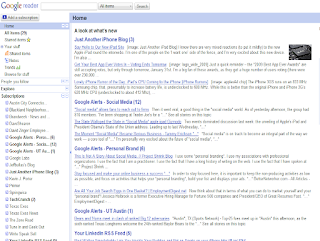 Here's a screenshot (click to see larger image) of my Google Reader. You can see Google Alerts and the RSS feeds under Subscriptions.
The next place I go to for great content are a few catch-all Web sites. I like AllTop the best. I've created my own "dashboard" filled with the content that interests me most. This easy-to-use site allows me to pull a few stories to tweet from visiting one Web site.
Google Alert FAQ
What is RSS?
Second, I wanted to learn how to share my tweets. I knew that I would be balancing between three "places" to tweet: at home, at work, and on my iPhone. I've yet to find one catch-all tool but I use two main programs: TweetDeck and HootSuite.
Now, here's where I complicate things - sort of.
For almost all of my tweeting and tracking I use HootSuite. Here's why:
I mainly use TweetDeck for iPhone (instead of the desktop browser).
Both tools have their limitations but HootSuite is my preferred tweeting and updating tool.
How to Use #li for Your Tweets
How to Use #fb for Your Tweets
First, I wanted to find the best ways to gather articles of interest to share. I recommend using two main tools: an RSS feed and a catch-all Web site like AllTop.
I use Google Reader for two reasons. Google Reader allows me to use both RSS feeds and Google Alerts on one page. I fill Google Reader with RSS feeds from blogs that share important information for me. RSS feeds keep e-mail subscriptions out of my inbox and share blog content with me as it's published. Google Alerts are sent to my RSS feed (you can also have them e-mailed but I only send an alert for my name via e-mail) based on search results for topics of interest; e.g. "social media," "personal branding," "UT Austin." These alerts will pull content and postings and deliver them in a listing.

The next place I go to for great content are a few catch-all Web sites. I like AllTop the best. I've created my own "dashboard" filled with the content that interests me most. This easy-to-use site allows me to pull a few stories to tweet from visiting one Web site.
Google Alert FAQ
What is RSS?
Second, I wanted to learn how to share my tweets. I knew that I would be balancing between three "places" to tweet: at home, at work, and on my iPhone. I've yet to find one catch-all tool but I use two main programs: TweetDeck and HootSuite.
Now, here's where I complicate things - sort of.
For almost all of my tweeting and tracking I use HootSuite. Here's why:
- Allows me to easily track my posts. Tracking allows me to see the number of people who click links I share. It also allows me to see the best times of the day to post for my followers. Great view of stats online and on the iPhone app.
- Easily add update(s) for LinkedIn, Twitter and Facebook in one place. I can search updates across all three platforms and post updates to one, two or all three.
- I can add multiple Twitter accounts and manage them. This will be very important when I begin managing the Twitter work account.
- Most importantly for me, I can schedule my tweets. I LOVE this feature. I usually read my RSS feeds in the morning and schedule my tweets throughout the day around times I want them to go out.
- Web-based. Very helpful, especially at work where I cannot download a program like TweetDeck or Seesmic Look.
- I also use the HootSuite iPhone app (~$1.99) but prefer to use TweetDeck for iPhone (free) to view tweets and Facebook updates. HootSuite for iPhone is limited. You can schedule tweets and view Twitter feeds and searches. You cannot view Facebook or LinkedIn. To post updates you would need to set up #li and #fb and add this to your tweets (not a fan of this).
- Hootlet. Great tool. Easily share content since it sits in your Bookmark Toolbar.

I mainly use TweetDeck for iPhone (instead of the desktop browser).
- TweetDeck was my primary twitting application but since it does not schedule tweets and does not seamlessly track my tweets I use it limitedly. (Have to add a bit.ly account to track but not flawless.)
- TweetDeck for Desktop is very clean and shows Twitter, LinkedIn, Facebook and other "feeds" based on your preferences. It also allows to you easily post updates to all of these.
- I can't use TweetDeck for Desktop at work since I have to download a program.
- TweetDeck for iPhone is great. I use it almost exclusively over HootSuite. It also beats out HootSuite since I can e-mail tweets and post to Facebook at the same time.
- TweetDeck for iPhone does not support LinkedIn at this time but #li at the end of your tweets will post.
- Sometimes I will go find a tweet on HootSuite especially if I want to schedule the tweet to go out at another time.

Both tools have their limitations but HootSuite is my preferred tweeting and updating tool.
How to Use #li for Your Tweets
How to Use #fb for Your Tweets
Summary: Google Reader/Alerts and AllTop to gather information, organize my tweets and send out through HootSuite (and sometimes TweetDeck).
How do you collect, organize and share your tweets?
Subscribe to:
Posts (Atom)